
Keypoints are the important spots on an object that an AI model learns to find, such as the joints of a person, the corners of a face, or the edges of a machine part. Each one is saved as a simple coordinate on the image.
TL;DR
- Keypoints are labeled points on an image or video frame that mark specific locations on an object, such as body joints, facial features, or corners.
- Keypoint definition: each keypoint is stored as an (x, y) coordinate, often with a visibility value, and a model learns to find the same points on new images.
- What is a keypoint used for? Pose estimation, facial landmark detection, hand tracking, sports analytics, robotics, and more.
- Keypoints vs. other annotation types: a bounding box shows where an object is, while keypoints show how its parts are arranged.
- Quality matters: accurate, consistent keypoint annotation directly decides how well a model performs.
Keypoint definition
In computer vision, a keypoint is a data point that records the exact position of one distinct feature on an object. In a 2D image it is written as (x, y) pixel coordinates. In 3D data it is written as (x, y, z).
Most annotation formats also attach a visibility value to each keypoint. It tells the model whether the point is visible, hidden behind something, or not labeled at all.
A reliable keypoint has three qualities:
- Distinct: it can be told apart from the area around it.
- Repeatable: the same location can be found again across many images of the same kind of object.
- Meaningful: it carries information about structure, pose, or movement.
Several keypoints are usually grouped into a set, often called a skeleton or landmark schema. For example, a human pose might use points for the nose, shoulders, elbows, wrists, hips, knees, and ankles.
What is a keypoint?
Keypoint is a way to tell a model where the important parts of an object are. Instead of outlining a whole object with a box or mask, you mark only the spots that describe its shape or posture.
This makes keypoints lightweight and efficient. A model trained on keypoints can understand how a person is standing, how a hand is positioned, or how a part is aligned, using a small amount of structured data per image.
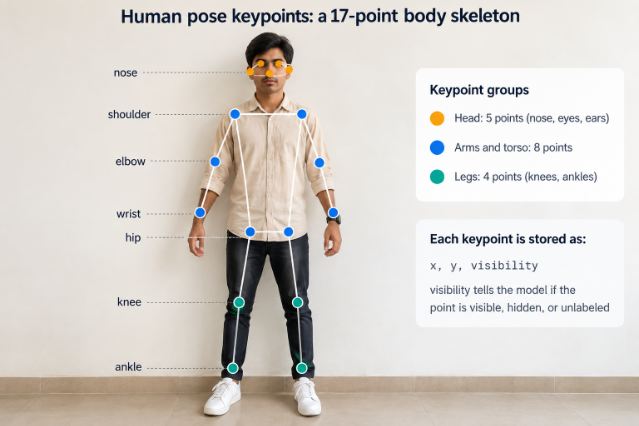
Two types of keypoints
1. Classical keypoints (feature points). Algorithms detect these automatically, usually at corners, edges, or highly textured spots. Methods such as SIFT, SURF, and ORB find these points and describe them so images can be matched, stitched, or tracked.
2. Annotated keypoints (landmarks). People label these on purpose, such as body joints or facial landmarks. A deep learning model is then trained to predict the same points on new images. Most modern AI projects, and the data annotation work behind them, use this type.
What are keypoints used for?
- Human pose estimation: tracking body joints to understand posture and movement.
- Facial landmark detection: locating eyes, brows, nose, and mouth for alignment, expression analysis, and AR effects.
- Hand and gesture tracking: mapping finger joints for sign language and touchless controls.
- Sports and fitness analytics: checking form and technique frame by frame.
- Robotics and manufacturing: finding grasp points, part corners, and alignment marks.
- Autonomous driving: locating vehicle corners and wheels.
- Healthcare and ergonomics: assessing posture, gait, and range of motion.
- Animal and agriculture research: tracking animal pose and behavior.
What a keypoint looks like in data
Keypoints are usually stored in a structured file. In the widely used COCO format, each person’s keypoints are saved as a flat list of x, y, and visibility values:
{
“keypoints”: [310, 142, 2, 298, 150, 2, 322, 150, 1, 0, 0, 0],
“num_keypoints”: 3
}
Each group of three numbers is one keypoint: x position, y position, and visibility. In COCO, 0 means not labeled, 1 means labeled but hidden, and 2 means labeled and visible.
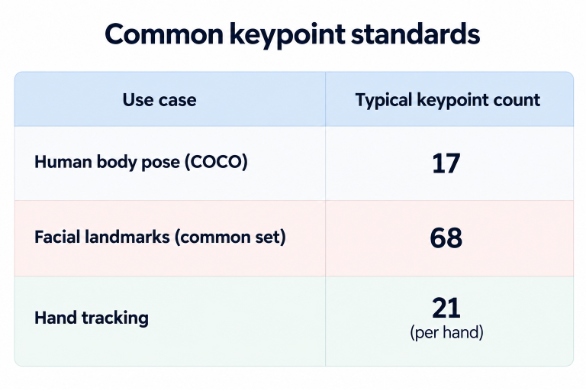
The number depends on the task and dataset. Fewer points are faster to label and train. More points capture finer detail.
How keypoint annotation works
- Define the schema. Decide which points to label and in what order.
- Write clear guidelines. Show exactly where each point goes and how to handle blur and edge cases.
- Place the points. Annotators mark each location, often using a template to speed up the work.
- Set visibility. Label each point as visible, occluded, or not in frame.
- Connect points into a skeleton. Linking points makes structure clear and errors easier to spot.
- Review and quality check. Multiple review rounds catch misplaced or inconsistent points.
Challenges in keypoint annotation
- Occlusion: joints and corners are often hidden by other objects or body parts.
- Precision: small placement errors can reduce model accuracy.
- Consistency: annotators may place the same point differently without clear guidelines.
- Volume: pose datasets often need thousands of images with many points each.
- Video: points must stay consistent from frame to frame.
Best practices for accurate keypoints
- Keep the point list limited to what the task needs.
- Add visual examples for every point in your guidelines.
- Set a clear rule for hidden or uncertain points.
- Use review stages and measure agreement between annotators.
- Run a small pilot batch before scaling up.
- Use model-assisted pre-labeling, then have people correct it.
How keypoint models are evaluated
Keypoint models are commonly scored with metrics such as Object Keypoint Similarity (OKS), which compares predicted points to labeled ones, and PCK (Percentage of Correct Keypoints), which counts predictions that fall within a set distance of the true location. Accurate annotation matters because these scores are only as reliable as the labels behind them.
Conclusion
Keypoints give AI models a simple, structured way to understand the shape, posture, and movement of objects. By marking only the points that matter, they keep data lightweight while still capturing the detail that pose estimation, facial analysis, and gesture tracking depend on.
Keypoint annotation with Objectways
Objectways provides human-in-the-loop data annotation for computer vision teams, including keypoint, pose, and landmark labeling. Our trained annotators and multi-stage quality checks help teams build accurate datasets for pose estimation, facial analysis, robotics, and more.