
AI Annotation
AI annotation is the process of labeling raw data, such as images, video, audio, text and sensor streams, so a machine learning model knows what that data contains. The labels are what the model treats as the correct answer, which is why annotation quality sets the ceiling on model quality.
Key takeaways
- Annotation turns raw data into training and test data by attaching labels to it.
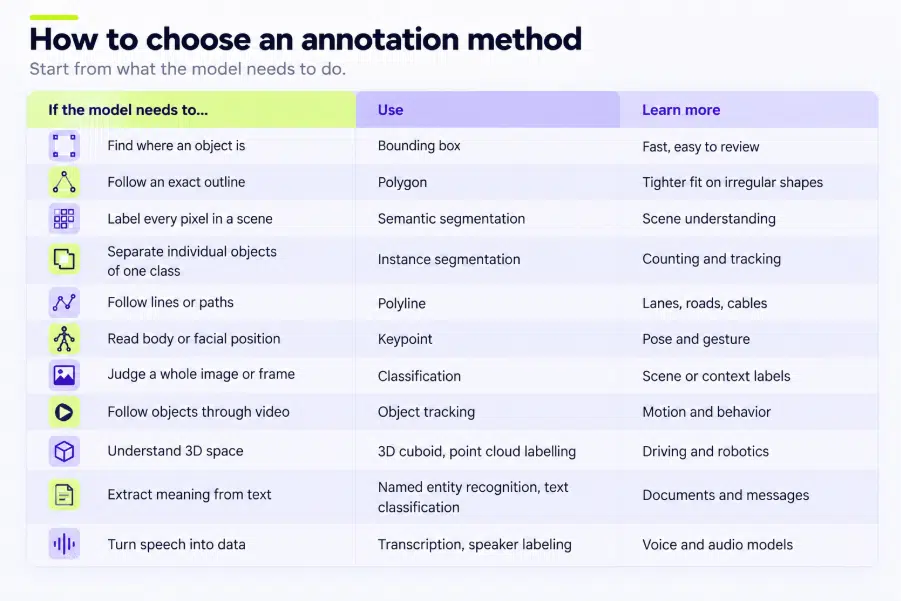
- The right method depends on what the model must do: locate, outline, count, track or understand.
- Manual, automated and human-in-the-loop workflows trade speed against accuracy. Most production teams combine them.
- Consistent labels matter more than a large volume of inconsistent ones.
What Is Annotation?
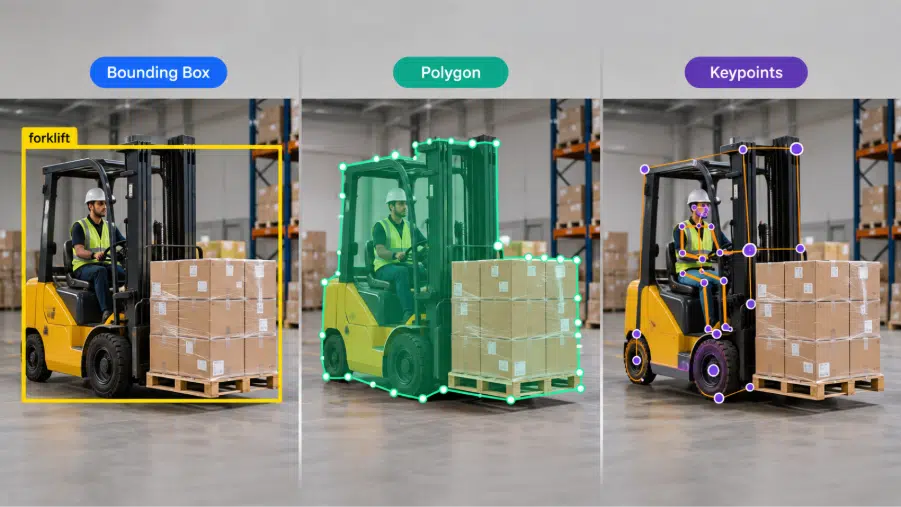
A model cannot look at a photo and know it shows a forklift or read a message and know it is a complaint. It learns those links from examples where the answer has already been marked. Those marks are annotations.
An annotation can be a category (“damaged”), a location (a box around a pallet), an outline (the edge of a road), a transcript of speech or a tag on a phrase (“delivery date”). Thousands of them together form a training dataset.
The term overlaps with data labeling. “Annotation” is often used when the work is more detailed, such as masks, keypoints or relationships between objects.
How Does Annotation Work?
AI annotation follows a repeatable cycle: decide what the model needs to learn, write clear rules for labeling it, label the data, check the labels, then feed the results back into the model and improve them. Most projects move through these steps:
1. Define the task and the labels: Start with what the model must do, such as detect defects, transcribe calls or track hands in video. From that, build the label schema (the ontology): the classes, attributes and relationships annotators will apply.
2. Prepare the data: Raw data is collected, cleaned and sorted. Duplicates, unusable files and sensitive content are removed, and the data is split into batches annotators can work through.
3. Write guidelines and run a pilot: Guidelines define each label with examples and edge cases. A small pilot batch tests whether people read the instructions the same way, and the guidelines are revised before full production begins.
4. Label the data: Annotators apply labels using an annotation tool. Depending on the project, they label from scratch, or a model creates first-pass labels (pre-annotation) that people then correct. See manual, automated and human-in-the-loop annotation below.
5. Review and check quality: A second person verifies or corrects the work, and metrics such as inter-annotator agreement show whether labels are consistent. Items that fail review go back for correction.
6. Deliver, train and improve: The finished labels are exported in the format the model needs and used for training and testing. When the model makes mistakes, the errors are traced back to the data, and the guidelines and labels are updated. This is why annotation is a loop, not a one-time task.
Types of Annotation
Annotation can take different forms depending on the type of content and the information being captured.
Text Annotation
Text annotation involves adding labels or information to written content. It can be used to identify entities, classify text, detect sentiment, recognize intent, or mark specific linguistic features.
Image Annotation
Image annotation involves identifying and labeling objects, regions, or other elements within an image. Common techniques include bounding boxes, polygons, segmentation masks, and keypoints.
Video Annotation
Video annotation involves labeling objects, actions, events, or other elements across video frames. Because objects can move between frames, video annotation may also involve tracking objects over time.
Audio Annotation
Audio annotation adds information to audio recordings. Examples include speech transcription, speaker identification, timestamps, and sound-event classification.
Document Annotation
Document annotation involves adding information to documents to identify, classify, organize, or provide context for specific content. It may include comments, highlights, labels, metadata, or classifications.
Applications of Annotation
Annotation is used across a wide range of fields.
Artificial Intelligence
Annotated datasets can be used to develop and evaluate machine learning models.
Computer Vision
Images and videos can be annotated to identify objects, regions, movements, and visual features.
Natural Language Processing
Text can be annotated to identify entities, sentiment, intent, relationships, and other linguistic information.
Speech and Audio Processing
Audio annotation can support speech recognition, speaker identification, transcription, and sound-event detection.
Research and Education
Researchers and students can annotate documents, publications, and learning materials to highlight important information and add context.
Document Analysis
Organizations can annotate documents to classify content, identify specific information, and organize large collections of files.
Why Is Annotation Important?
Annotation makes information easier to interpret, organize, analyze, or process for a specific purpose.
In AI and machine learning, the quality and consistency of annotations can affect the usefulness of the resulting dataset. When annotation guidelines are clear and annotators apply them consistently, the resulting data can provide more reliable information for model development and evaluation.
In other applications, annotation can help readers understand content, allow researchers to categorize information, and make large collections of data easier to analyze.
The usefulness of an annotation therefore depends on factors such as accuracy, consistency, relevance, and suitability for its intended purpose.
Annotation vs. Labeling
Annotation and labeling are closely related terms, and their meanings can overlap depending on the context.
Labeling generally refers to assigning a category, class, or name to a piece of data. Annotation can have a broader meaning and may include labels as well as additional information such as boundaries, attributes, relationships, timestamps, or metadata.
For example, assigning the label “car” to an image is labeling. Drawing a bounding box around the car and recording its location, category, and other attributes is a form of annotation.
The distinction between the two terms can vary depending on the industry and application.
Conclusion
Annotation provides a structured way to add meaningful information to existing content and data. Its applications range from simple notes and document markings to complex labeling workflows used to prepare datasets for artificial intelligence and machine learning.
As annotation tasks become more specialized, factors such as accuracy, consistency, clear annotation guidelines, and quality control become increasingly important. Understanding these fundamentals helps organizations and researchers create annotated information that is reliable, useful, and suitable for its intended application.