A robot demonstration can contain thousands of pieces of information. Camera frames, joint positions, gripper movements, timestamps, and task descriptions all have to stay connected for the recording to make sense.
However, such robot data often works well only inside the lab that recorded it. Issues arise when the recording leaves the lab, because for years robotics teams stored the same kinds of data in very different ways.
Some teams saved robot data as message logs, while others used formats built for reinforcement learning or scientific computing. The robot could work with all of them, but the training software typically couldn’t. An embodied dataset collected in one lab could take days of work before another team could load it, and converting it was rarely as simple as changing the file type.
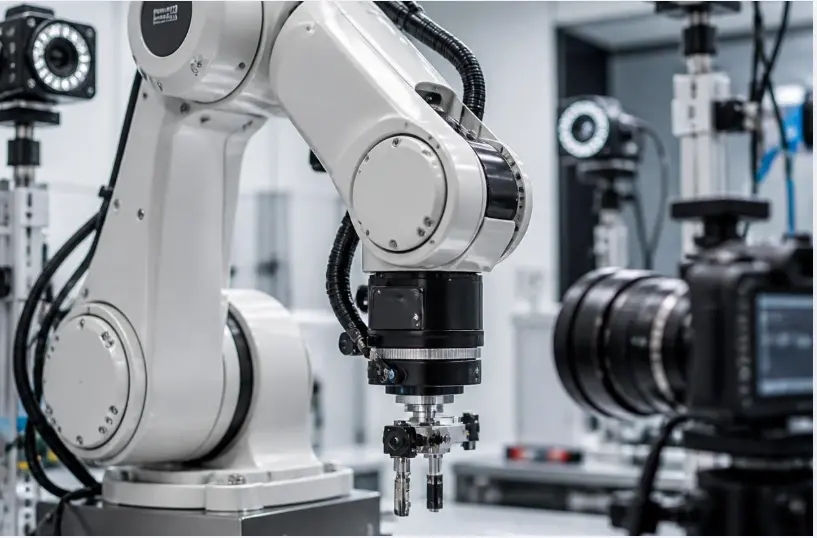
Hugging Face built the LeRobot dataset format to fix this, so robot demonstrations could be stored, published, and loaded in one consistent structure. Today, many robotics datasets are available in the LeRobot format, and various training tools and pretrained models support it.
Teams sitting on older datasets can convert them too, and some do it at scale. For example, the AgiBot World dataset contains more than a million trajectories from 100 robots across 2,976 hours, and the team provides a script to convert the data into the LeRobot dataset format.
It sounds simple enough. But take a closer look at what happens during a conversion, and you’ll find the tricky part: a dataset can move into a structure other teams can read and still lose parts of the recording. Every format is built to hold certain kinds of information, and anything that doesn’t fit has nowhere to go. The files still open normally, so nothing tells you something is missing.
In this article, we’ll look at what a LeRobot dataset contains, how it compares with other formats, and what can get lost during conversion, so you know what to check before you train on one. Let’s get started!
LeRobot is an open-source Python library that Hugging Face launched in May 2024. It was released under Apache 2.0 and covers the robot learning process from collecting data to running a trained policy on hardware.
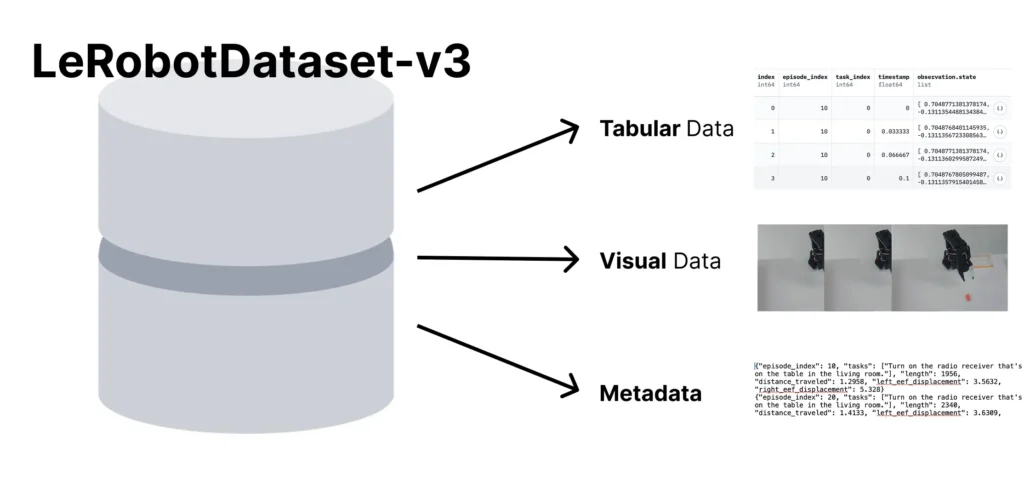
The LeRobot dataset format is the part that handles how that data is stored. A LeRobot dataset is a package of different parts, and each part stores a different piece of the robot’s demonstration.
In the LeRobot format, one recorded demonstration is called an episode. An episode is one complete attempt at a task, from the moment the robot starts to the moment it finishes. That is the main unit the format works with.
For instance, a single frame of a robot reaching for a cup tells you very little on its own. The tools for editing and inspecting these datasets work on whole episodes for the same reason. You can delete, split, and visualize by episode index.
Here’s an overview of what goes into a LeRobot dataset:
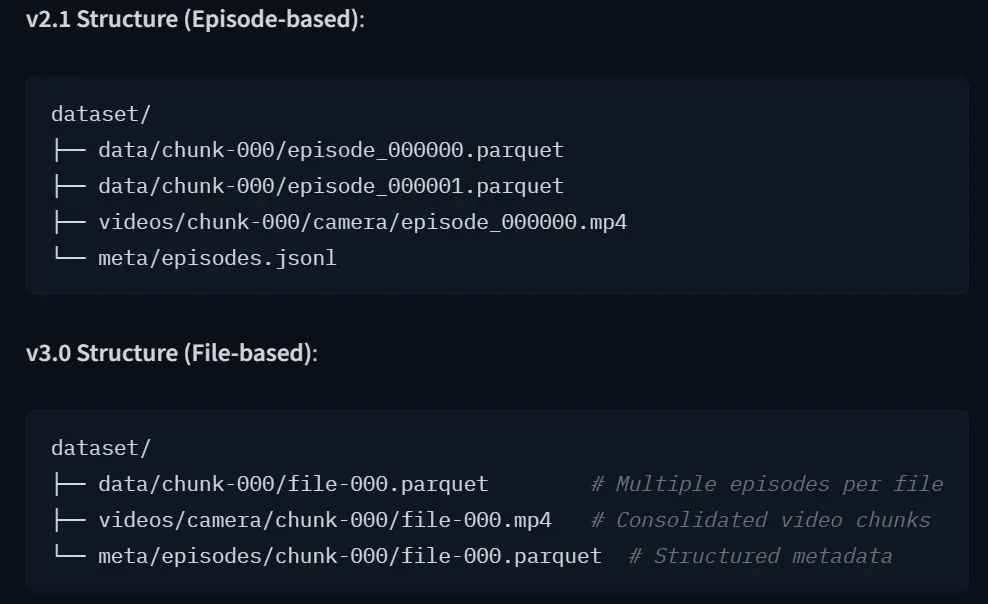
All of this travels with the dataset, so the information explaining what the data means doesn’t have to live in a separate lab README or with the person who collected it. That makes the dataset easier to move between teams and training systems.
But there is also a limit. A dataset can only carry information that its structure has a place for.
Before the LeRobot dataset format existed, how robot data was stored depended on the team collecting it.
On one hand, Google’s robotics work used a TensorFlow-based format built for reinforcement learning, where the robot learns by trying a task and getting a score for the result. On the other hand, labs with a scientific computing background used HDF5, which lets you organize files however you like. Meanwhile, teams working with ROS kept raw robot message logs.
Each choice suited the team that made it, but none of them traveled well. Open X-Embodiment showed what happened when researchers tried to bring these datasets together. The project assembled data from 22 different robots across 21 institutions, covering 527 skills, into a single format that could handle different numbers of cameras, depth sensors, and point clouds.
Putting the data together was easy. Making sure it all meant the same thing was much harder. Depending on the dataset, the same number could mean moving the gripper to an exact point, moving a few centimeters from its current position, or moving at a particular speed. Feed the wrong value to a robot, and it can move somewhere you didn’t intend.
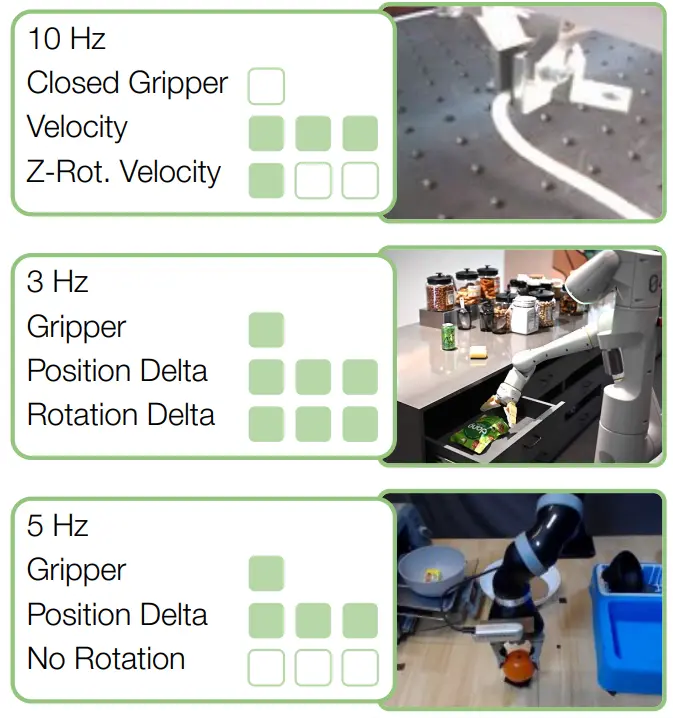
The LeRobot dataset format made this easier by giving teams a common structure to work with. Many of the dataloaders that feed training, the visualizers that play episodes back, and the pretrained policies teams fine-tune from expect that same structure.
Now that we have seen why LeRobot became a common format for robot datasets, let’s understand how it compares with the formats that came before it.
Each dataset format came from a different part of the robotics field, so each was built around different needs. It is crucial to understand what each format assumes about the data, because that assumption decides what it stores well.
Here’s what each format is designed for:
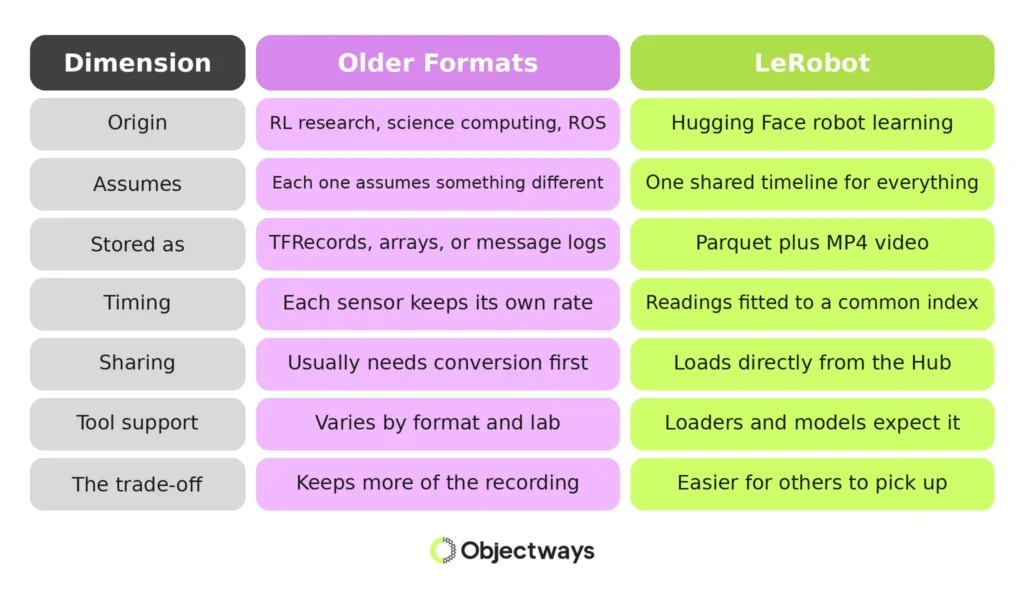
There is a trade-off running through all of this. A format that lets you keep the original data however it came, like HDF5, is harder for another team to pick up.
Whereas a format that makes sharing easy, like LeRobot, has already made decisions about how your data should be organized. The right choice depends on your training setup and what you need to keep from the original recording, not on which format is newest.
Next, let’s look at what happens during the conversion process itself. A conversion script can reorganize the data it is given, but it can’t recreate information that was never recorded. It also can’t automatically preserve information that the target structure or conversion pipeline doesn’t know how to carry across.
Start with the source itself. Before converting a dataset, check exactly what the version you have contains.
A dataset may already have been filtered, compressed, or reduced for training, so the files you receive may contain less information than the original recording. Converting that version to LeRobot doesn’t bring the missing data back.
Then look at how each part of the recording maps into the new structure. LeRobot provides a standardized way to organize robot-learning data, including video, tabular signals, and metadata.
But a conversion still has to decide how the source dataset’s features should be represented. If a signal, annotation, or piece of metadata isn’t mapped into the resulting dataset, it may be left behind even though the rest of the recording converts successfully.
Timing is another place where information can change. Different sensors may record at different frequencies and with their own timestamps. A conversion may align those streams to a common frame structure, which can require resampling or interpolation. If the original timestamps and sampling relationships aren’t preserved, the converted dataset may no longer contain enough information to reconstruct the original timing exactly.
Calibration needs the same attention. Camera intrinsics, camera poses, robot configuration, and other calibration information may be stored separately from the main sensor data. If a conversion pipeline doesn’t carry that information into the new dataset, the recordings can still look perfectly normal while losing information that matters for tasks involving geometry or precise spatial relationships.
The same applies to annotations and other metadata. Task labels, coordinate conventions, sensor descriptions, and preprocessing information can be just as important as the raw measurements themselves. If they are omitted or changed during conversion, the resulting files may still load correctly while their meaning has changed.
That is the quiet part of data conversion. A successful conversion doesn’t necessarily mean a complete conversion. The episodes can load, the videos can play, and the dataset can pass basic checks while some information from the original recording is no longer available.
Some of what a conversion drops only shows up when you check the converted files against what the original recording held. Other problems are visible in the files themselves. It’s often faster to start there, then go back to the source for the rest.
Opening a dataset and checking a few episodes is straightforward. The LeRobot dataset visualizer runs in a browser and plays episodes with the video and sensor graphs moving together.
You can watch the demonstration while seeing what the robot was recording at the same time. There is also a command-line version if you want to visualize a dataset stored on your own machine.
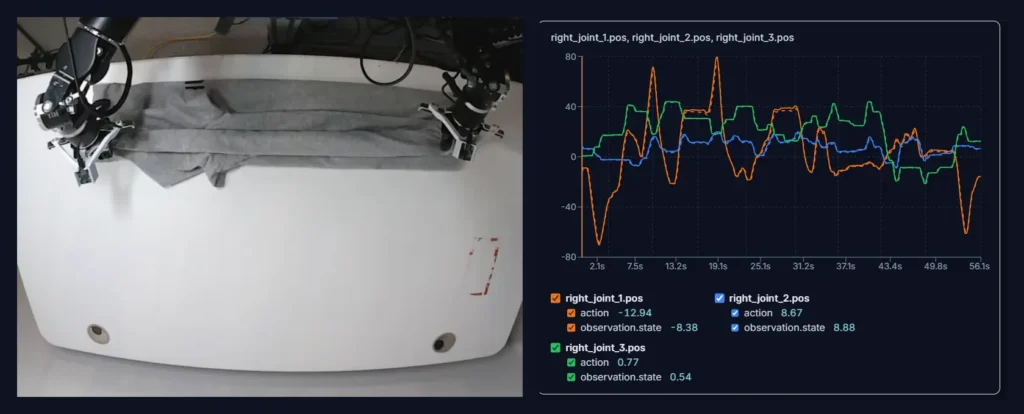
Here’s what to look for:
A LeRobot dataset can tell you exactly how its files are organized, but it can still leave one important question unanswered: can you actually use the data? That depends on the license. A dataset can be easy to download, convert, and load while still having restrictions on how you can use it.
Two datasets on the Hub show this clearly. RealSource World holds more than 11,000 episodes of dual-arm manipulation, while LIBERO is a simulation benchmark from UT Austin, re-published on the Hub in LeRobot format. Both load through the same tooling, but their terms are completely different.
LIBERO carries an Apache-2.0 license, which permits commercial use. RealSource World is released under CC BY-NC-SA, which doesn’t permit commercial use, and it asks for your contact details before you can download anything.
The license can also vary based on the copy you happen to find. LIBERO appears on the Hub more than once, and another widely used copy carries CC-BY-4.0 rather than Apache-2.0. Same benchmark, different terms, depending on which repository you pull from.
A conversion script changes how the data is stored. It can’t change who is allowed to use it. A non-commercial license is fine while you are testing an idea, but it becomes a problem once a model trained on that data ships in a product. So check the license and the specific repository you took the data from before the conversion work starts, not after.
Let’s say you’re collecting or buying robot data for training. What should you look at before the files arrive? Teams tend to judge a dataset by its size, but the way the data was captured and delivered matters just as much.
Here are the main factors to check:
Every item on that list is easier to arrange before data collection starts than to fix afterward. Doing it in-house means setting up a recording rig and training operators. It also involves handling calibration and checking the data before it reaches your training pipeline. That is why many teams bring in a data partner instead.
That’s exactly what we specialize in at Objectways. We collect teleoperation, egocentric, and UMI gripper demonstrations and deliver them in the format your physical AI training stack uses. We also handle the annotation, validation, and quality checks needed to make those recordings ready for training.
The LeRobot dataset format solved a problem that used to cost teams days. A dataset recorded in one lab can be much easier for another team to load without writing a completely custom parser.
That convenience has an edge to it. A shared structure works because it is the same every time, which means anything the conversion pipeline has no defined way to represent may be dropped, transformed, or left outside the resulting dataset. That is why the last check before training shouldn’t be whether the dataset loads.
Watch a few episodes. Hold the metadata up against the dataset card. Read the license while there is still time for the answer to matter. An hour here is cheaper than finding out after a training run why the policy behaves the way it does.
If you’re building a robotics or physical AI system, Objectways can help with the training data your system needs. Contact our team to learn more.
LeRobot is an open-source Python library from Hugging Face, released in May 2024. It covers the robot learning process from collecting demonstrations to running a trained policy on hardware, and it includes the LeRobot dataset format, which is used by many robot-learning datasets published on the Hugging Face Hub.


See how SLAM VR tracking works inside a headset, where it fails, and why a drifting head pose weakens egocentric and teleoperation data.
Explore the main types of lidar sensors, how they measure distance, and which types of robots are best suited to 2D, 3D, flash, and FMCW...