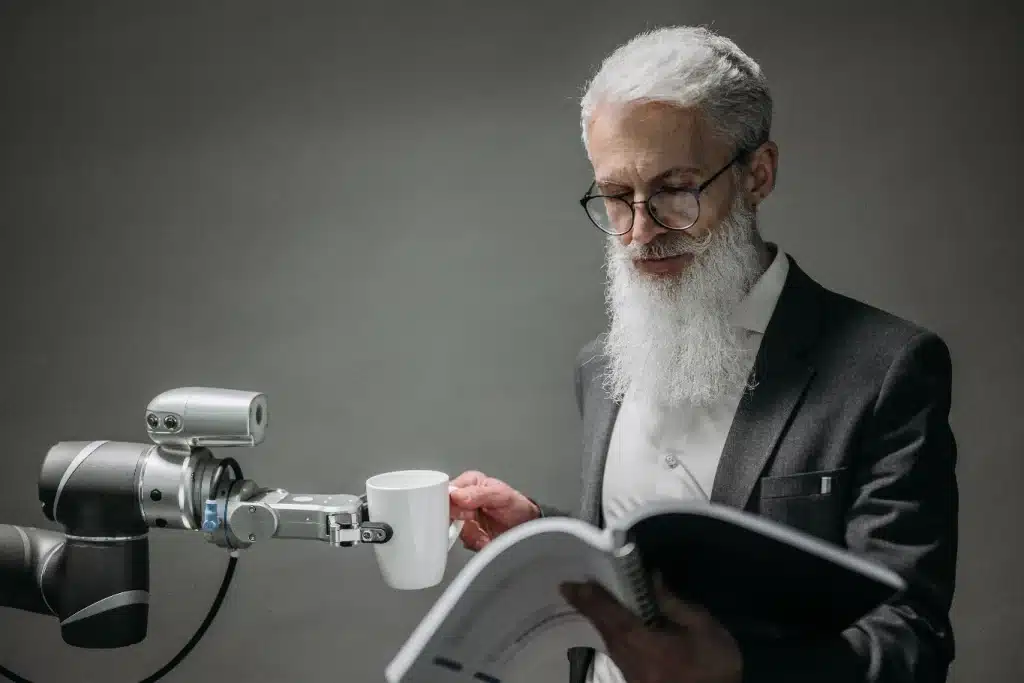
When a robot hands someone a cup of coffee, it needs to understand more than just where their hand is. It has to identify their fingertips, read the position and angle of their hand, and hold the cup so the handle is free and turned toward them.
Many computer vision models are trained on images annotated with bounding boxes, simple rectangles drawn around each object. A model trained this way can tell where the hand or cup is, but not its shape, orientation, or important parts. Keypoints fill that gap.
Keypoint annotation involves marking specific points on people or objects in images and videos. These points can be body joints, fingertips, a bottle’s cap, the corners of a box, or anything else a robot needs to find to do its job.
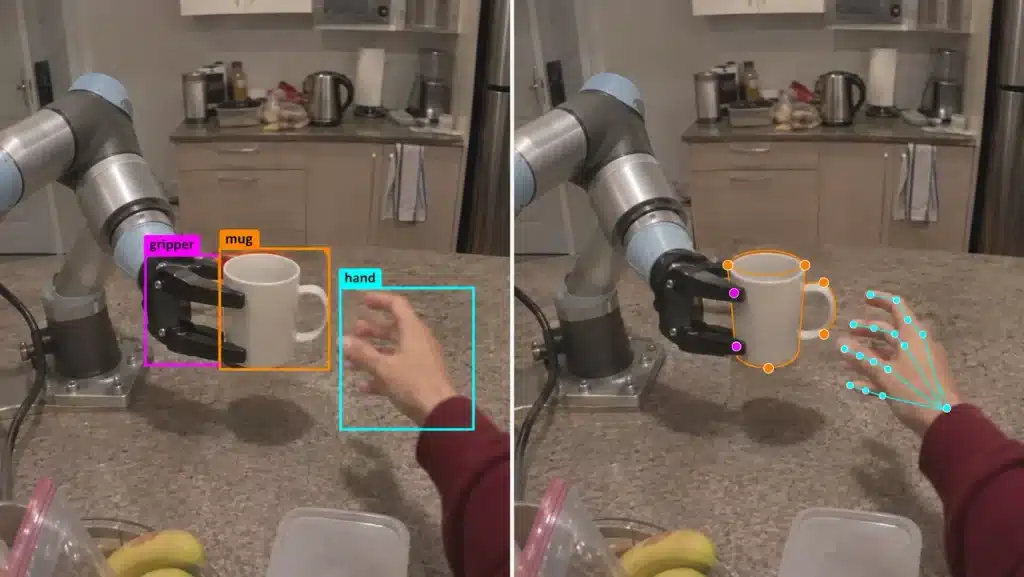
That makes these labels a link between what a camera sees and what a robot does. A camera captures pixels, but a robot needs precise positions to reach for, grasp, and move objects. Keypoints turn one into the other.
They’re used in two main ways. Points on people show how humans move and use their hands, such as how someone reaches across a table, holds a tool, or pinches a small object. Points on objects show a robot where to grip an item, which parts to avoid, and how to position it after picking it up.
These labels need to be accurate because robots rely on them to learn how to move and handle things. Even a fingertip marked just a few pixels off can lead to a missed grasp or a dropped object.
In this guide, we’ll explore how keypoint annotation works, how skeletons and visibility labels are used, and how human and object keypoints support robot training. We’ll also cover common annotation mistakes and how to avoid them. Let’s get started!
Keypoint annotation is the process of marking certain points on a person or object using coordinates. Each point has a name or label (such as wrist, fingertip, or handle) and an x and y position in the image, plus a depth value in 3D projects. A visibility label marks whether the point is visible or hidden, such as a finger tucked behind a cup or a handle covered by a gripper.
In some fields, this type of data labeling is called landmark annotation. The term is more common for faces and medical images, where the points mark features like the corners of the eyes or key structures in an X-ray.
Once these points are labeled, they can be connected to show how the parts of a person or object relate to one another. This set of connections is called a skeleton.
In a human skeleton, the shoulder connects to the elbow and the elbow to the wrist, while a hand skeleton links each fingertip through the finger joints back to the wrist. Object skeletons work the same way. On a mug, for example, points on the rim might connect down to the base, with the handle points attached to the side.
These connections enable AI models to understand how the parts fit together. Instead of seeing each point as a loose dot, the model learns that a wrist is attached to an arm and that a mug’s handle sits in a fixed spot on its body.
Knowing this structure also helps the model work out where a hidden point probably is, based on the visible points around it. The full plan behind this, meaning which points to label, what they’re called, their order, and how they connect, is called a schema.
All of this labeling happens before a model is trained, and that’s the main difference between keypoint annotation and keypoint detection. Keypoint annotation creates the labeled images and videos used to train AI models, either manually or with model-assisted tools and human review.
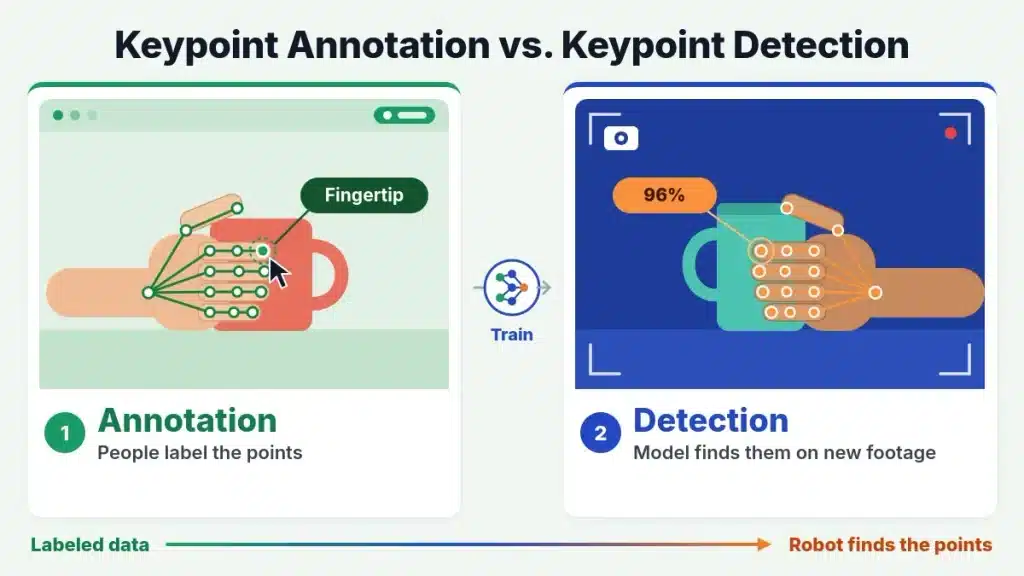
Keypoint detection is what the trained model does afterward. It finds those same points on its own in new images or video.
Every keypoint project starts by settling on a schema. For human pose annotation, this usually means a standard set of points like the shoulders, elbows, wrists, hips, and knees, which rarely changes from project to project. Robot projects, however, often need custom schemas built around a specific task, such as a gripper’s contact points or a tool’s handle and tip.
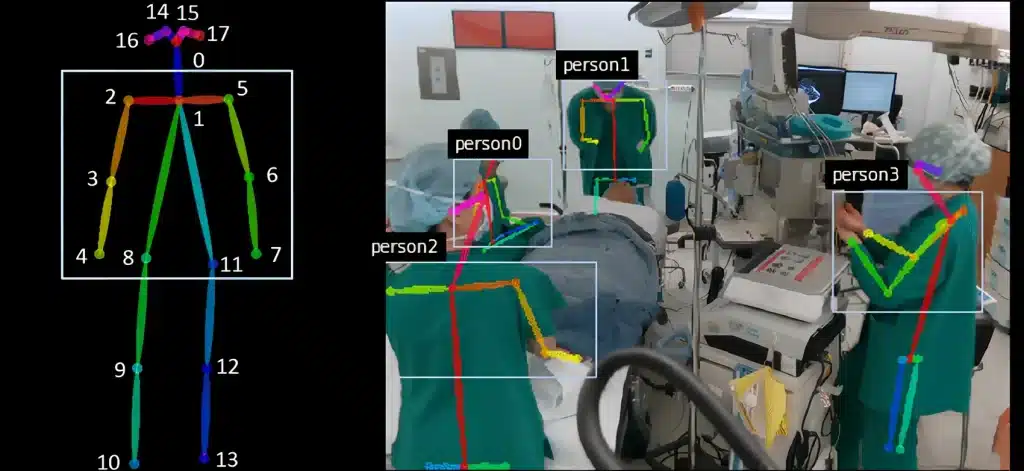
The COCO keypoints format is a common standard for labeling human poses. It uses 17 body keypoints and records three values for each one: (x, y, v). The x and y values give the point’s location in the image, and v shows whether it can be seen. A v of 0 means the point wasn’t labeled, 1 means it was labeled but is hidden, and 2 means it’s visible. The COCO dataset includes keypoint labels for more than 250,000 people.
Many tools and models build on this format. For example, the COCO-18 layout, popularized by OpenPose, adds a neck point to COCO’s 17 keypoints. It connects the points into a skeleton that runs from the nose and neck through the shoulders, elbows, and wrists down to the hips, knees, and ankles.
Choosing the right points is only part of the job. Annotators (people who label the data) also need written placement rules that say exactly where a wrist, fingertip, or handle center should be marked. Without them, different annotators will place the same keypoint in slightly different spots.
Beyond this, the right keypoint annotation tool makes the work faster. It lets annotators reuse skeleton templates, fill in points between video frames automatically, and start from pre-labels made by an AI model, which they then check and correct.
Some projects also need 3D keypoints. In that case, the same points are labeled in footage from several synced cameras, and each point’s 3D position is calculated by combining those views.
Human keypoints help robots learn how people move and interact with objects. Labeled body keypoints are used to train human pose estimation models, which find a person’s joints in new footage.
Skeleton tracking then follows those keypoints across video frames, creating a record of movements like reaching, bending, walking, and picking things up. Robots and humanoids can learn from these movement patterns to perform similar tasks.
However, precise manipulation needs more detail, which is where hand pose estimation comes in. It tracks the position and movement of individual fingers. Google’s MediaPipe Hands, one of the most widely used models, tracks 21 keypoints on each hand, covering the wrist, knuckles, finger joints, and fingertips, from a regular camera image.
Once those points are tracked, they can be mapped onto the matching joints of a robot hand, a process called retargeting. This lets a robot copy the way a person grips, pinches, or turns an object, so it can handle things more naturally.
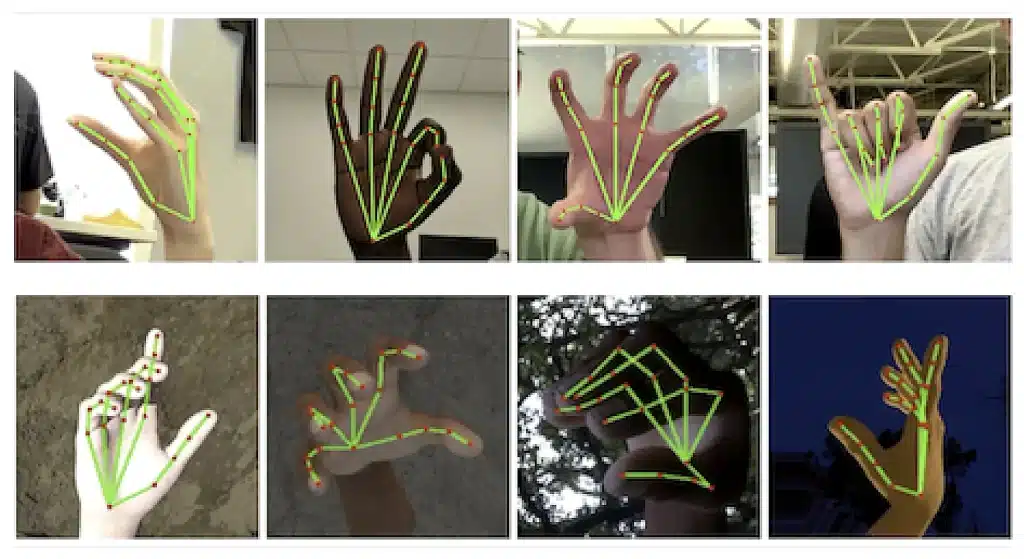
Large datasets are making this kind of learning possible at scale. Apple’s EgoDex dataset, for example, pairs 829 hours of egocentric video with 3D hand and finger tracking, showing in detail how people handle everyday objects from a first-person view.
This kind of data is similar to what motion capture (mocap) records. Mocap uses sensor suits to track movement directly, while keypoints labeled on video are more affordable and work with footage recorded almost anywhere.
Object keypoints teach robots where to look and where to make contact. They mark the parts of an object that matter for a task, such as a mug’s handle, a bottle’s cap, or the edge of a box. This gives a robot information about the specific parts it needs to interact with, rather than just the object’s overall shape.
Once these points are labeled, they can also be used for 6D pose estimation, which works out both where an object is and which way it’s facing in 3D space. By tracking a few known points, such as the corners of a box, a robot can calculate an object’s position and angle before reaching for it. This is a key part of how computer vision in robotics helps robots handle objects accurately.
Another important idea is category-level keypoints. These are points that can be found on every object of the same type. For example, every mug has a handle and a rim, even if mugs come in different shapes, sizes, and colors.
Since a robot can’t be trained on every mug that exists, annotators label these shared points instead of details that only apply to one mug. A robot trained on the handle and rim of a few mugs can then find those same points on a new mug it has never seen before.
Researchers are now finding ways to identify these points automatically. One example is KALM (Keypoint Abstraction using Large Models), a robot learning framework developed by researchers at MIT. It helps robots learn new tasks from just a few demonstrations.
KALM uses large vision-language models (VLMs) to find the keypoints that matter for a task, like the handle on a coffee machine or the edge of a drawer. The robot then learns its movements relative to those points.
The researchers tested KALM on a real robot arm, which used these keypoints to lift a coffee machine handle, open a drawer, and pour into a bowl. Since no one has to define the keypoints by hand for each object, the robot can more easily apply what it learned to new ones.
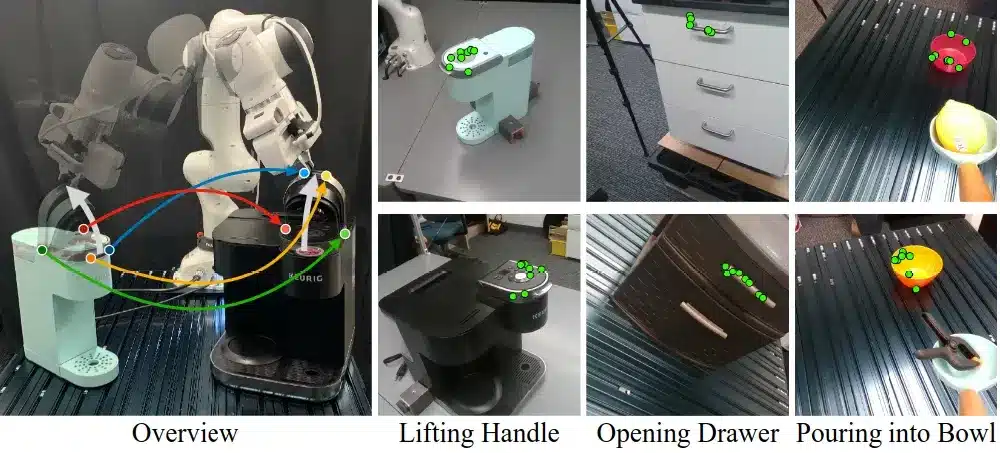
ReKep (Relational Keypoint Constraints) is a similar method developed at Stanford in 2024. It uses vision models to find keypoints on objects. Then a vision-language model turns a plain-language instruction into rules about where those points should be relative to each other.
For example, a pouring task becomes a rule like “keep the teapot’s spout above the cup.” The robot then plans its movements to follow these rules. ReKep was tested on both a single-arm robot on wheels and a two-armed robot.
Labeled keypoints are used to train AI models that can detect the same points on their own in new images and video. Some of the most common keypoint detection models are YOLOv8 Pose (along with the newer YOLO26 Pose), RTMPose, and MediaPipe Pose.
MediaPipe Pose, for example, detects 33 body landmarks, including points on the shoulders, elbows, wrists, hips, knees, and ankles. These points help the model track a person’s posture and movements.
However, off-the-shelf models don’t automatically fit every robotics task. Most general-purpose pose models, including the latest YOLO versions, are trained on people in everyday photos and use a fixed set of points, such as COCO’s 17 body keypoints. They aren’t designed to find a gripper’s contact point, a tool’s tip, or a mug’s handle. Tasks like these need a custom keypoint schema and labeled data that matches the task.
Because of this, many teams fine-tune a pretrained model (one that has already been trained on a large dataset) using their own custom labels, instead of training a new model from scratch. Once the model performs reasonably well, it can pre-label new footage for annotators to review and correct, which speeds up future labeling.
The way keypoints are used can have a measurable effect on how well a robot learns. In a recent study, researchers trained a robot to place a mug in a box in simulation. When the robot learned from a few hand and object keypoints instead of a full 3D scan of the scene, its success rate rose from 46.3% to 57.3%, using the exact same demonstrations.
Results like this depend on keypoints being labeled accurately and consistently. Here are some common problems that get in the way:
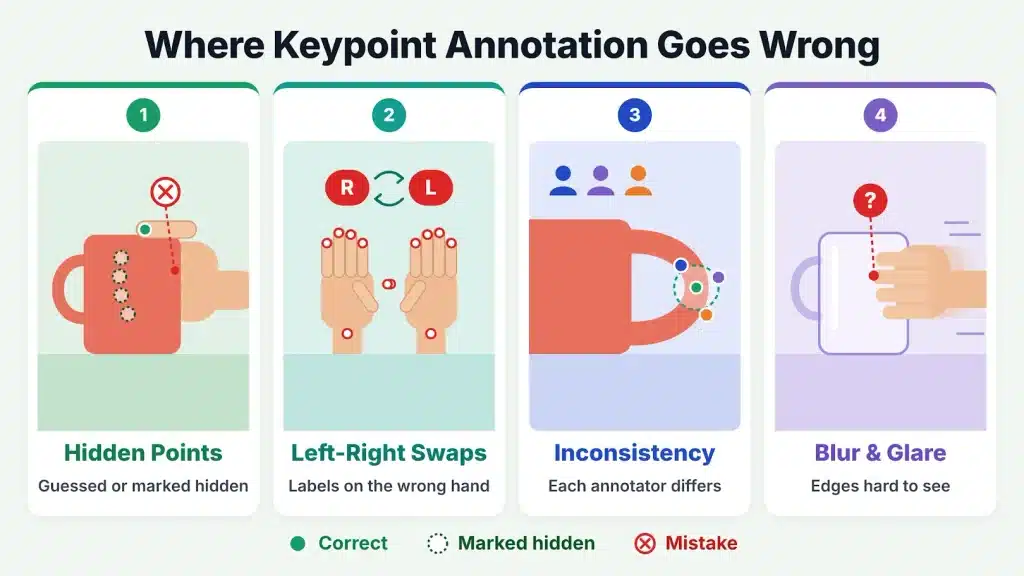
Regular quality checks can catch these issues early. Teams can compare labels against an agreed reference set and measure how closely different annotators agree, also known as inter-rater reliability. A common metric for this is object keypoint similarity (OKS), which scores how closely two sets of keypoints match while accounting for the object’s size.
Good robot training data starts with a clear annotation plan. Before any labeling begins, teams need to agree on which points are essential for the task and how annotators should mark them. This usually includes:
Model-generated pre-labels can speed up the work, but they still need human review. Annotators should check every hand position and object contact point, since even small errors can change how a robot learns to grasp and handle objects. Working with an experienced annotation partner can take a lot of this workload off your team.
At Objectways, we provide keypoint labeling and skeleton annotation for images and video, covering human pose, hand, and object keypoints for robot training. We also help robotics teams collect, annotate, and validate the data they need, from egocentric video and teleoperation demonstrations to depth data and robot trajectories.
A robot can learn where to grasp a mug, how to copy a person’s hand movements, or how to pour from a teapot using a small set of labeled keypoints. But those points are only useful if they’re labeled the same way across every image and video frame. A task-specific schema, clear visibility rules, and quality checks such as OKS scoring turn raw footage into consistent training data.
Building a robotics dataset? Reach out to Objectways to learn how our data annotation and collection services can support your robot training needs, from keypoint and skeleton labeling to complete datasets.
Three common types are bounding boxes, segmentation, and keypoints. Bounding boxes show where an object is, segmentation outlines its exact shape, and keypoints mark specific spots, like joints or a mug’s handle, where a robot might make contact.


Explore imitation learning vs reinforcement learning in robotics, when to use or combine them, and the training data each one needs
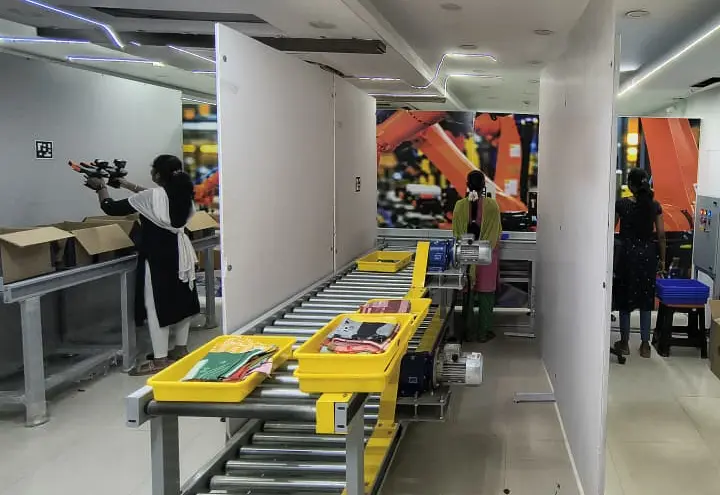
Learn how a pick and place robot is trained to sort automotive parts using UMI gripper demonstrations, which parts suit it, and what to avoid